comparison
Best VideoScribe alternatives, including free options (2026)
Contents: What is VideoScribe?
VideoScribe gives you full control over every scene of a whiteboard video, but assembling each scene yourself takes time. Hence, we compared nine alternatives, including free ones. Some generate the whole video for you, and others have you assemble the scenes yourself, much like VideoScribe.
This guide is for anyone who makes whiteboard videos, including teachers, trainers, course creators, marketers and creators of faceless channels.
What is VideoScribe?
VideoScribe, made by Sparkol, is whiteboard animation software. You place hand-drawn images on a canvas, set the timing on a timeline and choose where the view pans and zooms, and VideoScribe draws each image with an animated hand.
VideoScribe alternatives compared
The table compares nine VideoScribe alternatives with VideoScribe itself. Some tools generate the whole video for you, and others, like VideoScribe, have you assemble each scene yourself from ready-made drawings.
| Tool | How you make it | Longest video | Languages | Free option | Best for |
|---|---|---|---|---|---|
| VideoScribe | You build it, with AI help | 5, 10 or 20 min by plan | 45+ (AI voiceover from Core) | 7-day trial, 3 watermarked downloads | Assembling whiteboard scenes yourself |
| Scenema | AI generated | 21 min | 75+ | 200 credits, 1,000-character scripts, watermarked | Long whiteboard explainers with consistent characters |
| Doodly | You build it | Not stated | Not stated | 14-day trial | Drag-and-drop doodles on a desktop app |
| Powtoon | You build it, with AI tools | 3 min on the free plan | Not stated | Free plan, 720p, watermarked | Whiteboard alongside other animated styles |
| Golpo AI | AI generated | 2 min on Starter, 10 min on Business | 45+ (from Creator) | One 1-min preview, no download | Short whiteboard videos from documents |
| DistilBook | AI generated | About 36 min (whiteboard) | 20 | Free credits for a first video, watermarked | Document explainers in 19 styles |
| Vyond | You build it, from an AI draft | 25 to 90 min by plan | 95 | Trial with watermarked exports | Training teams that need many styles |
| MotioAI | AI generated | 10 min | 40+ | Free start, limits not stated | Whiteboard videos from prompts and scripts |
| Animaker | You build it, with AI voices | 5, 15 or 30 min by plan | Not stated | Free plan, watermarked | Whiteboard and 2D animation for beginners |
| SpeedSketch | AI draws one image | 15 sec on the free plan | Not stated | Free, 720p, no watermark | Animating a single drawing or logo |
How we compared these tools: We surveyed the websites and pricing pages of all the tools we mention in October 2026. We have not tested the quality of each tool’s videos, and plans change often, so check each site before you choose. Scenema is our own product.
The best VideoScribe alternatives
Scenema makes long whiteboard explainers for you
Scenema generates the whole whiteboard video from a script, notes or an uploaded PDF or Word document, so there is no canvas to fill yourself. Scenema writes the narration for you to review, then plans the video as scenes and shots, which keeps the same characters and style in every scene. Videos run up to 21 minutes, in eight hand-drawn whiteboard styles as well as other styles. Narration comes from over 500 voices in more than 75 languages, with optional captions. The free plan gives 200 credits once on sign-up, for scripts of up to 1,000 characters, and exports at 480p with a watermark. See the pricing page for paid plans.
Best for: Long whiteboard lessons and training videos without building each scene.
Doodly is the closest match to VideoScribe
Doodly works much like VideoScribe. You drag a doodle image onto the canvas, and Doodly draws it automatically. It offers whiteboard, blackboard, glassboard and green screen backgrounds, and a library of characters, scenes and props drawn by its own artists. You record or upload your own voiceover. Doodly is desktop software for Mac and PC, and it comes with a 14-day free trial of the Voomly Cloud bundle.
Best for: People who like VideoScribe’s way of working and want a desktop alternative.
Powtoon has a free plan and many styles
Powtoon offers whiteboard templates alongside many other animated styles. Its AI tools include script writing, text to speech and avatars. The free plan allows videos of up to 3 minutes at 720p with a Powtoon watermark.
Best for: Short whiteboard videos on a free plan, with room to try other styles.
Golpo AI generates whiteboard videos from documents
Golpo AI turns a PDF, Word file, slide deck, URL or prompt into a hand-drawn whiteboard explainer. Its cheaper plans make black-and-white videos of up to 2 minutes, and 10-minute videos need the $499.99 Business plan. Our guide to Golpo AI alternatives covers its plans in detail.
Best for: Short whiteboard explainers from documents.
DistilBook offers 19 styles for document explainers
DistilBook turns a document into an explainer with narration and captions from a script you approve. Its 19 styles include hand-drawn whiteboard looks and motion-graphics styles. DistilBook says every style renders in color on every plan, and a whiteboard video can run to about 36 minutes. Paid plans cost $20, $50 and $100 a month.
Best for: Document explainers in several visual styles on a small budget.
Vyond includes whiteboard in a wider training tool
Whiteboard animation is one of the styles in Vyond, an animation builder for workplace training. Its Vyond Go feature drafts a video from a prompt, document or URL, and you then edit every scene. Videos run up to 25, 40 or 90 minutes depending on the plan, with voices in 95 languages. Vyond offers a free trial with watermarked exports.
Best for: Training teams that need whiteboard alongside other animation styles.
MotioAI focuses on whiteboard videos from prompts
MotioAI generates whiteboard animations from a prompt, a script or a document’s text, with more than 10 styles. Videos run up to 10 minutes, with voiceovers in more than 40 languages. Plans cost $19, $39 and $79 a month, and its site does not state the free limits.
Best for: Short whiteboard videos from prompts or scripts.
Animaker is a beginner-friendly animation suite
Animaker is a browser-based animation tool with whiteboard, 2D and live-action styles, built around drag and drop. Every paid plan includes whiteboard animations, AI text to speech and AI subtitles. Videos run up to 5, 15 or 30 minutes on the Basic, Starter and Pro plans, which cost $15, $25 and $43 a month billed yearly. The free plan exports with a watermark.
Best for: Beginners who want whiteboard alongside other animation styles.
SpeedSketch animates a single image for free
SpeedSketch turns one image into a hand-drawn animation in your browser, with no timeline to edit. The free plan makes clips of up to 15 seconds at 720p with no watermark. Paid plans add 1080p, 4K and text to video. It suits a quick drawing or logo reveal, rather than a narrated lesson.
Best for: A short, free drawing animation of one image or logo.
Is VideoScribe free?
VideoScribe is not free, but it offers a 7-day free trial with no credit card. During the trial you can download 3 videos of up to 5 minutes each, in full HD with a VideoScribe watermark. The trial includes up to 5 AI images and 2 minutes of AI script, and AI voiceover is not part of it. Projects carry over if you subscribe with the same account. Free accounts are marked for deletion 90 days after the trial ends.
How much is VideoScribe?
VideoScribe charges per user, and paying yearly costs much less than paying monthly. These are the US prices on its pricing page in October 2026. VideoScribe says the yearly plans save up to 65 percent compared with paying monthly.
| Plan | Yearly | Monthly | Max length | Downloads a month |
|---|---|---|---|---|
| Lite | $150 $12.50/mo | $35/mo | 5 min | 5 |
| Core | $255 $21.25/mo | $60/mo | 10 min | 30 |
| Max | $320 $26.67/mo | $75/mo | 20 min | Unlimited |
AI voiceover starts on Core, with 75 minutes a month, and Max gives 150. Lite includes more than 9,000 images and icons, while Core and Max include 5 million premium ones. Lite adds watermarks only on premium images, and Core and Max have no watermark. Max also adds a brand kit, custom fonts and reseller rights. Prices are per user and can differ by country.
VideoScribe also offers two discounts. Students and staff at educational institutions can get discounts starting at 25 percent, which grow with the number of licenses, by contacting its sales team. Registered charities and nonprofits in the USA and the UK get 50 percent off.
What does VideoScribe do well?
VideoScribe does several things well for people who want control over every scene:
- Full control: You choose every image, set the timing on a timeline and decide where the view pans and zooms.
- A large library: Core and Max include 5 million premium images and icons, and Lite includes more than 9,000.
- Browser or desktop: The browser version and the desktop app have the same features.
- Several formats: You can export widescreen, square or vertical videos as MP4 or GIF, in 1080p.
- AI help: From a document or talking points, AI writes the script, and it can also generate images and an AI voiceover.
Why do people look for a VideoScribe alternative?
People look for a VideoScribe alternative mostly because of limits on VideoScribe’s own pricing page:
- Time: You place and time every image yourself, so a 10-minute lesson means placing a great many drawings.
- Length: Lite stops at 5 minutes and Core at 10. A 20-minute lesson needs the Max plan.
- AI voiceover: It starts on Core, so Lite users record or upload their own narration.
- Free use: There is no free plan. The trial lasts 7 days and allows 3 watermarked downloads.
- Per-user pricing: Each person on a team needs their own license.
What do Scenema’s whiteboard styles look like?
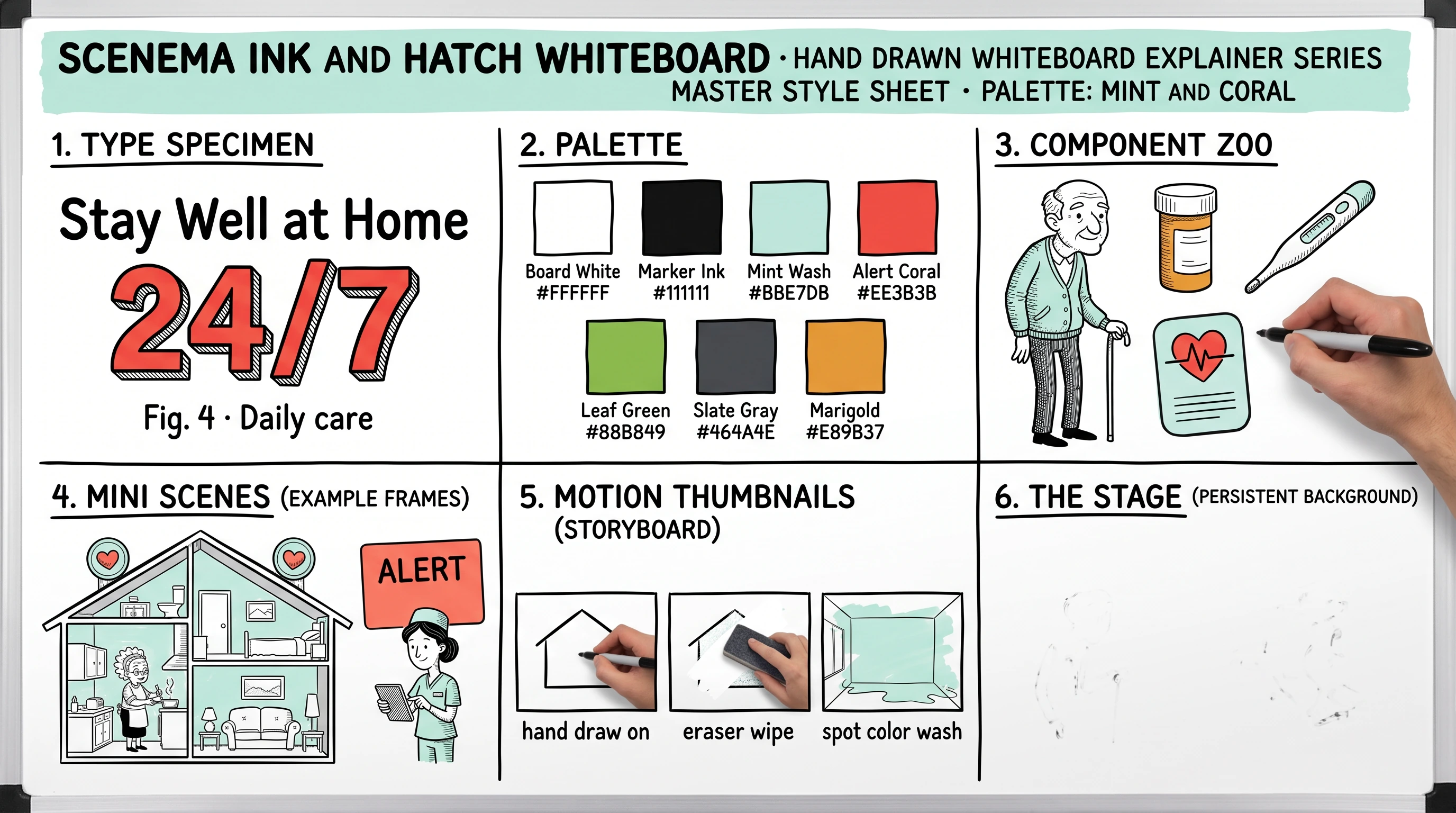
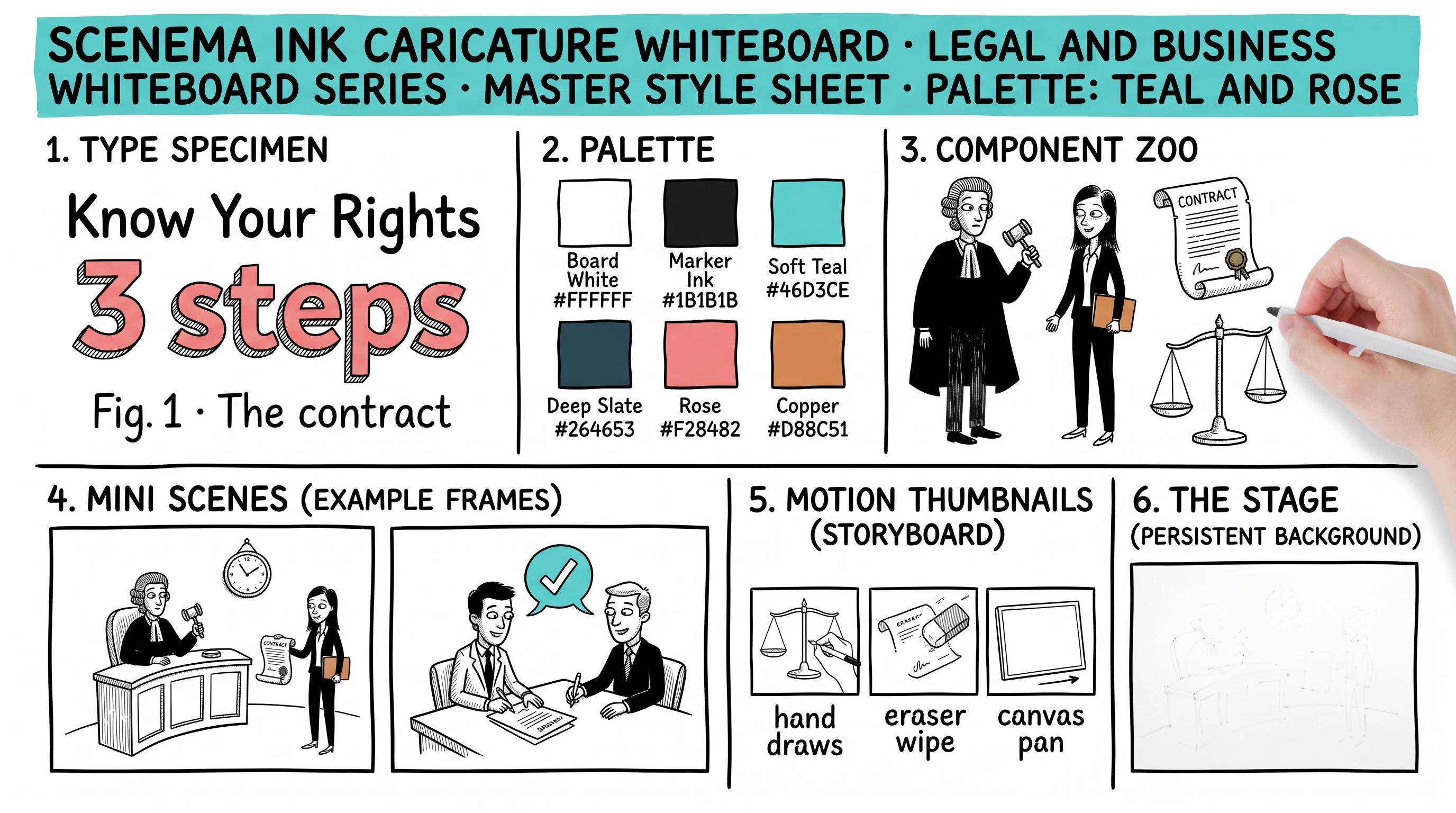
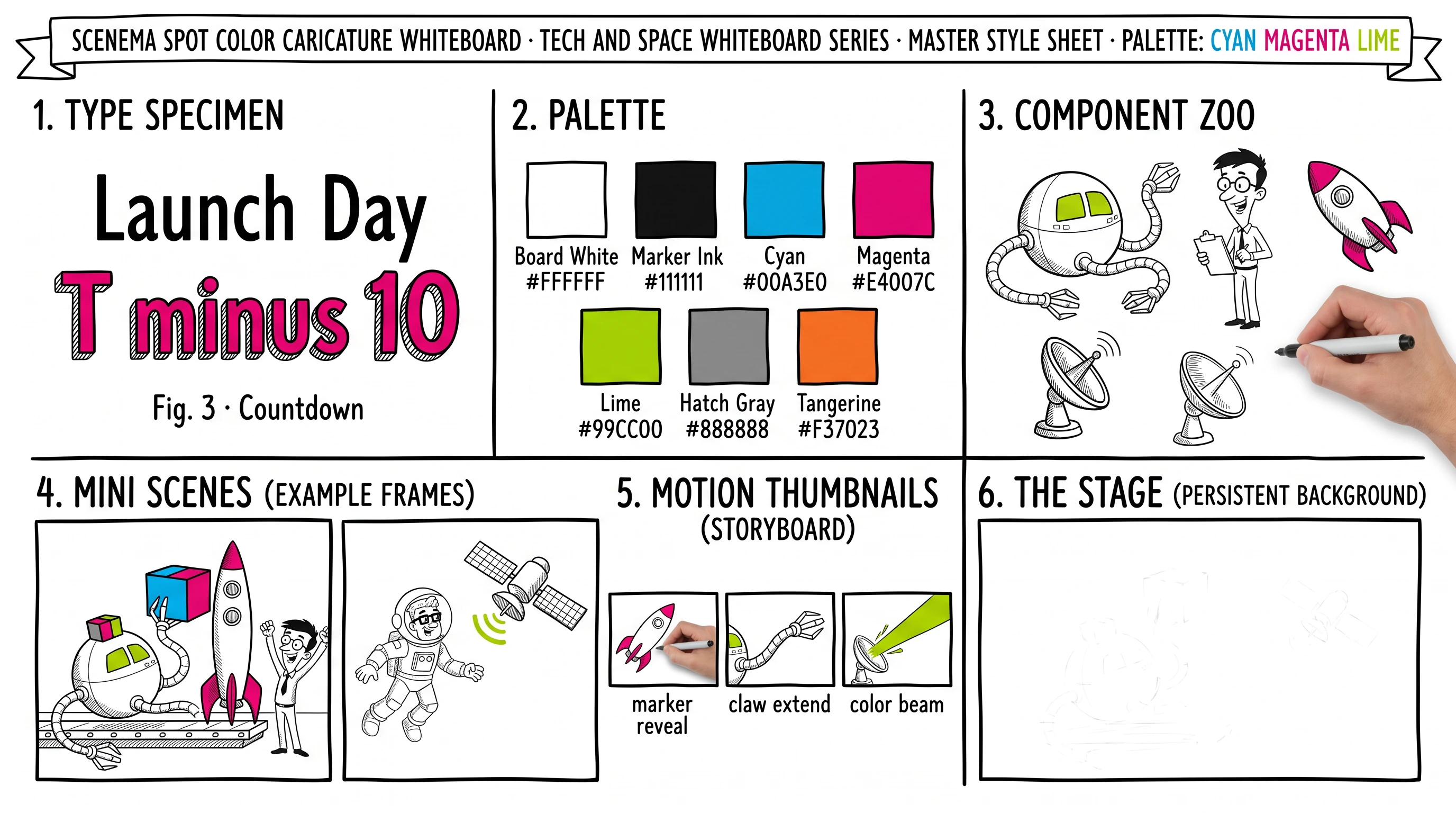
Each Scenema whiteboard style has a style sheet showing its characters, colors and example scenes. These are three of the eight styles. The rest are on the AI whiteboard video generator page.
How to choose a VideoScribe alternative
The right VideoScribe alternative depends on how much of the work you want to do yourself. Tick each item that matters to you, then compare the tools that meet it.
Checklist for choosing a VideoScribe alternative
Make a whiteboard video without building every scene
Start from your script, notes or document. Scenema writes the narration, draws every scene in the whiteboard style you choose and keeps your characters consistent from the first shot to the last.
The TL;DR on VideoScribe alternatives
Is VideoScribe free? VideoScribe is not free. It offers a 7-day free trial with no credit card, which allows 3 watermarked downloads of up to 5 minutes each.
Is there a free alternative to VideoScribe? Powtoon has a free plan that allows 3-minute videos at 720p with a watermark, and SpeedSketch animates a single image for free without a watermark. Scenema gives 200 credits on sign-up for scripts of up to 1,000 characters, exported at 480p with a watermark. DistilBook also gives free credits for a first video.
How much does VideoScribe cost? VideoScribe costs $150, $255 or $320 a year per user for its Lite, Core and Max plans, billed yearly, according to its US pricing page in October 2026. Billed monthly, the same plans cost $35, $60 or $75 a month.
Does VideoScribe have an education discount? VideoScribe offers education discounts starting at 25 percent for students and staff at educational institutions, on monthly or yearly plans. Registered charities and nonprofits in the USA and the UK can get 50 percent off.
Is VideoScribe good? VideoScribe suits people who want to control every image, its timing and how the view pans and zooms. It suits long lessons less well, because videos are capped at 20 minutes on the top plan and you assemble every scene yourself.
What is the closest alternative to VideoScribe? Doodly is the closest alternative to VideoScribe, because you also drag drawings onto a canvas and Doodly animates them. It is desktop software for Mac and PC.
Is there an AI that makes whiteboard videos for you? AI whiteboard generators such as Scenema, Golpo AI and DistilBook make the whole video from your script or document. Scenema makes whiteboard videos of up to 21 minutes with the same characters in every scene.
Who makes VideoScribe? VideoScribe is made by Sparkol.
About the author
Karishma Mhapadi holds a master’s degree in International Education Policy from the Harvard Graduate School of Education and a bachelor’s degree in psychology and sociology. She has worked on education and learning projects in international development with organizations including UNICEF, the World Bank, the African Development Bank, BRAC and GIZ. At Scenema she writes about how people learn from video and how to make explainers people understand and remember.
Sources
- Each tool’s website and pricing page, read in October 2026: videoscribe.co, videoscribe.co/pricing, VideoScribe’s free trial help page, and its education and charity pages, doodly.com, powtoon.com/pricing, animaker.com/pricing, speedsketch.co.uk, video.golpoai.com/pricing, distilbook.com, vyond.com/pricing, motioai.com/pricing.
Related reading
- Best Doodly alternatives for whiteboard videos compares whiteboard tools for people leaving Doodly.
- Golpo AI alternatives for whiteboard explainers compares whiteboard generators by length, color and price.
- Best AI educational video generators for teachers compares AI tools for lessons and training.
- AI whiteboard video generator shows all eight Scenema whiteboard styles.