comparison
Seedance 2.0 vs Kling 3.0 for animated explainers (2026)
Contents: How we tested Seedance 2.0 and Kling 3.0
Take any comparison on the web that pits Seedance against Kling, and you will find the same test examples: people walking through cities, cars at sunset, close ups of faces. We make animated explainer videos at Scenema, so we wanted to see how the two models handle the shots we work with every day. That means a flat 2D presenter, a labelled diagram or simply a character moving across a room.
When we gave both models the same starting image and the same prompt for each shot, we learned that Seedance 2.0 kept the flat style and followed the action more closely in two of the three tests. Kling 3.0 handled a slow camera move better, but drifted toward a more detailed, rendered look whenever a character moved.
How we tested Seedance 2.0 and Kling 3.0
We generated every clip directly through each model’s API on October 28, 2026, so neither model’s output was changed by another tool:
Test checklist
- Same starting imageOne flat 2D keyframe per test, drawn once and given to both models as the first frame.
- Same promptOne plain prompt per test, with no wording tuned for either model.
- Same length4 seconds per clip, the shortest length both models accept.
- Same resolutionSeedance 2.0 Fast at 720p and Kling 3.0 Standard at its native 720p.
- No soundAudio was off for both, so only the picture is compared.
- Start frame onlyBoth models can also take reference images to keep characters consistent. We tested the simpler start frame mode, which is how most people animate a single explainer shot.
Each test below shows the starting image and the exact prompt, then the two clips with our notes under each.
Test 1: Does each model keep a flat explainer style?
The first test is a presenter beside a whiteboard with a three step diagram, the most common shot in an explainer.
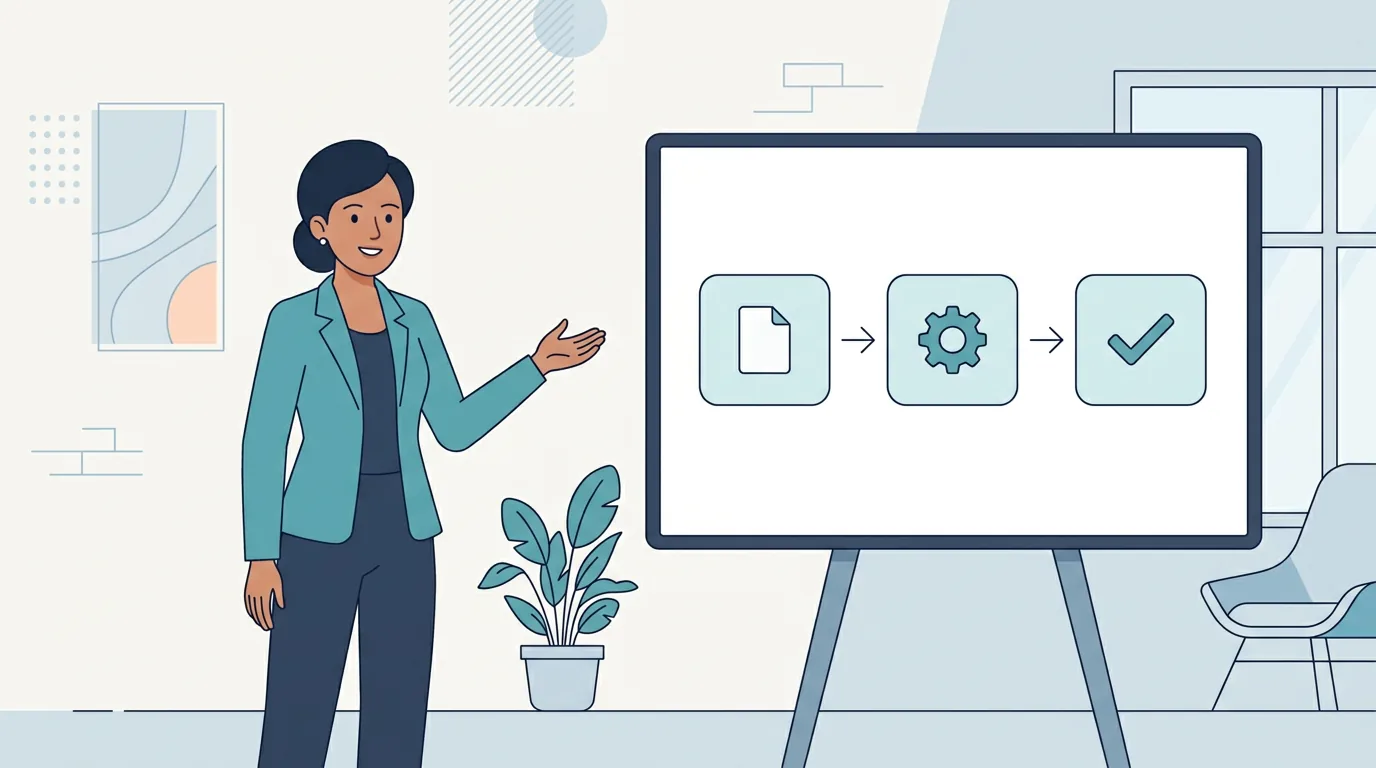
Starting image and prompt
“The presenter turns slightly toward the board and moves her open hand across the diagram, pointing to the first box, then the second, then the third. Each box gently brightens as she points to it. Camera holds still. Keep the flat 2D vector animation style of the image: flat colors, thin outlines, no shading, no photorealism, no new objects.”
- She stays in place and gestures across the board.
- The boxes brighten one after another, as asked.
- Flat colors and thin outlines never change.
- Around two seconds in, her face and hair change, and her blazer gains buttons and a pocket.
- She walks into the whiteboard and her arm passes through it.
- The diagram fades and ghosts by the last second.
- More motion than the prompt asked for.
Result: Seedance 2.0. It followed the instruction and kept the layout intact.
Test 2: Do labels stay readable when the camera moves?
The second test is a labelled plant cell with four large labels and a slow camera push in.
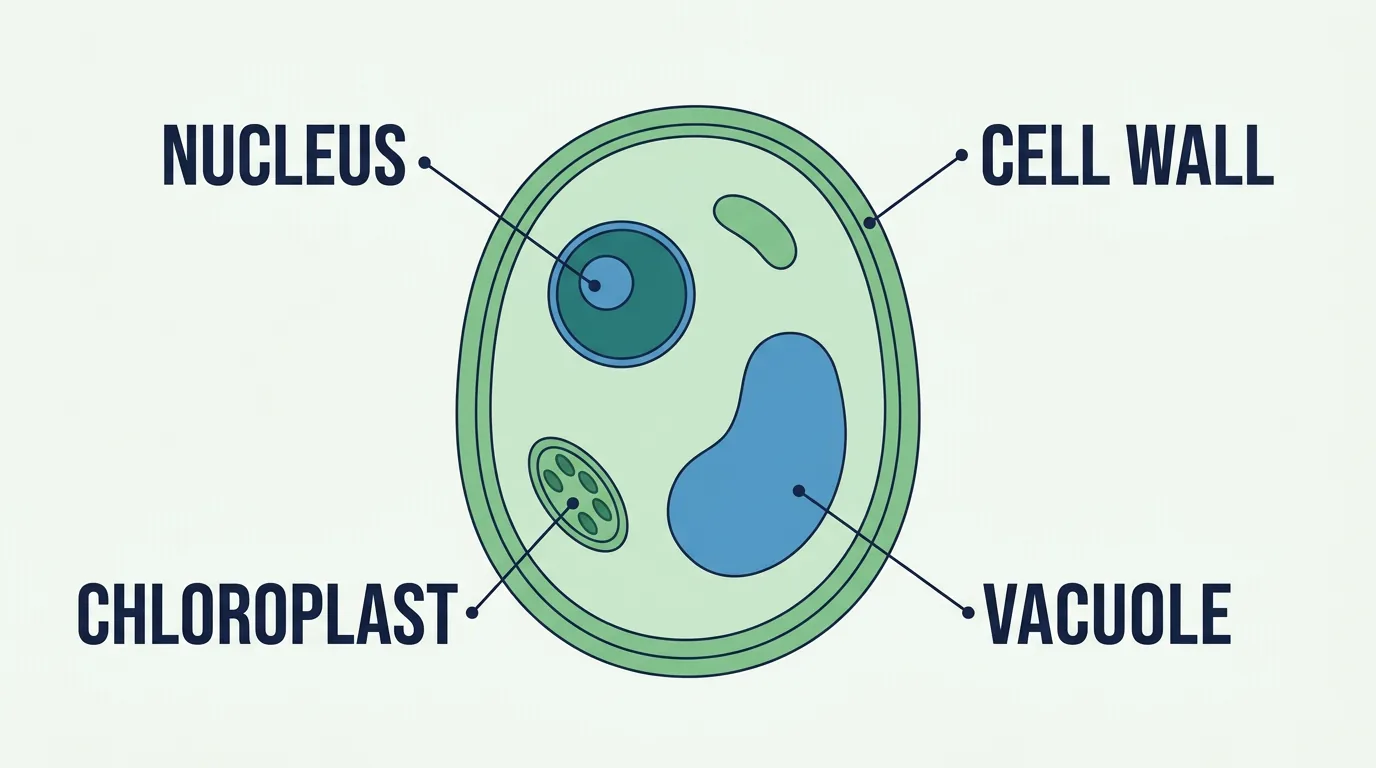
Starting image and prompt
“The camera slowly pushes in toward the center of the cell diagram. The four labels and their leader lines stay fixed in place and fully readable the whole time. Nothing else moves. Keep the flat 2D vector style of the image: flat colors, thin outlines, no shading, no new objects, no new text.”
- The letters stay sharp and correctly spelled.
- The camera pushes in far too hard.
- Labels leave the frame after about three seconds.
- The push in stays slow and steady.
- Labels stay readable for almost the whole clip.
- By the last frame, one label is cut at the edge.
Result: Kling 3.0 for camera control. Its gentle push in kept the labels readable for longer, while Seedance zoomed past them.
Test 3: Does the style hold through a big movement?
The third test is one character who walks across an office and sits down, the kind of movement that makes a drawing drift.

Starting image and prompt
“The man turns to his left, walks to the empty chair on the right and sits down on it, facing the viewer. Camera holds still. Keep the flat 2D vector style of the image and keep him exactly the same person: same face, round glasses, short black hair, mustard yellow sweater, white collar and dark grey trousers.”
- He walks across and sits down.
- Same flat colors and crisp outlines throughout.
- Shoes and clothes stay as drawn.
- He walks across and sits down.
- Adds rolled trouser cuffs, detailed shoes and fabric folds.
- Lines soften toward a rendered look.
Result: Seedance 2.0 for staying true to a flat style. Kling 3.0 finished the action, but its final frame no longer matches the drawing it started from.
Seedance vs Kling results at a glance
Seedance 2.0 won two of the three tests and Kling 3.0 won one:
| Test | What it checks | Seedance 2.0 | Kling 3.0 | Better |
|---|---|---|---|---|
| Presenter and diagram | Style and following the action | Flat style kept, boxes light up in order | Presenter walks into the board, diagram dissolves | Seedance 2.0 |
| Labelled diagram | Text readable on a camera move | Text sharp, but labels leave the frame | Gentle push in keeps labels readable for longer | Kling 3.0 |
| Walk and sit | Style through big movement | Same flat drawing throughout | Adds detail and softer lines | Seedance 2.0 |
Seedance 2.0 vs Kling 3.0 specs compared
These figures come from ByteDance’s documentation for Seedance and from Kling’s own pages, as published in October 2026.
| Seedance 2.0 Fast | Kling 3.0 Standard | |
|---|---|---|
| Clip length | 4 to 15 seconds | 3 to 15 seconds |
| Resolution | 480p or 720p (full Seedance 2.0 adds 1080p and 4K) | Native 720p (Kling 3.0 Pro renders 1080p) |
| Native audio | Yes, generated with the picture | Yes, with lip sync |
| Inputs | Text, image, audio and video, with up to 9 reference images, 3 videos and 3 audio clips | A start frame, an optional end frame and up to 3 consistent subjects |
| Multi shot | Yes | Up to 6 shots in one video |
ByteDance names explainer videos as a use case for Seedance 2.0. It also notes that “there is still room for optimization regarding multi-subject consistency, text rendering accuracy, and complex editing effects.” Our label test matches that: The text stayed sharp, but the model did not keep it in frame.
What about Seedance 2.5 and Kling 4.0?
Both models have newer versions. We did not test them, so these facts come only from the makers’ own pages:
- Seedance 2.5: Clips run from 4 to 30 seconds, with output up to 1080p. It can take up to 50 references: 30 images, 10 videos and 10 audio clips. It has been available on BytePlus since August 6, 2026, but BytePlus is not offered in the United States.
- Kling 4.0: Kling opened it to all users on October 15, 2026. Clips run from 3 to 30 seconds, with up to 15 references, up to 10 keyframe images and two channel audio. Kling says 4K and 1080p HDR output is coming soon.
For the differences between Kling versions, see our comparison of Kling 3.0 and Kling 4.0.
Which should you use for explainer videos, Seedance or Kling?
Pick by the shot you need most often:
- Flat 2D characters and presenters: Seedance 2.0. It kept the drawing style and the layout in both character tests.
- Slow camera moves over a diagram: Kling 3.0. It followed a gentle push in without overshooting.
- Labels and on screen text: Neither. Both kept letters sharp, but neither model can be trusted to keep text where it belongs. Add labels in editing instead.
- A long single take: Either. Both run up to 15 seconds per clip.
- A whole explainer, not one clip: Scenema. You give it a script or a document, and it plans the shots, draws every keyframe, narrates the video and puts it together for you.
Run your own style through both before committing, because a model that suits one style can drift in another.
Why a long explainer needs more than one good clip
Every test above starts from a single image and lasts 4 seconds. A 10 minute explainer can need well over 100 shots, and each new clip is a new chance for a character’s face, clothes or line style to change. Small drift, like the extra detail Kling added in test 3, adds up across a whole video.
In Scenema, every shot starts from a keyframe image drawn from the same character sheet. Each shot begins with the right character in the right style before anything moves. You see those images before they are animated, and you can redraw a single shot without touching the rest of the video.
You can pick from 78 styles, including flat 2D looks like the ones in these tests, and narration from more than 500 voices in over 75 languages. Each chapter runs up to 30 minutes. The free plan gives 200 credits when you sign up, enough to make a short explainer and see the result for yourself.
Turn your script into a full animated explainer
Give Scenema a script or a document. It narrates and animates the whole explainer in one style, with the same characters in every shot.
The TL;DR on Seedance vs Kling
Is Seedance better than Kling? For flat explainer animation, Seedance 2.0 did better in our tests. It kept the drawing style and followed the action in two of three shots, while Kling 3.0 handled a slow camera move better.
What is the difference between Seedance 2.0 and Kling 3.0? Seedance 2.0 Fast makes 4 to 15 second clips at up to 720p and accepts text, image, audio and video references. Kling 3.0 Standard makes 3 to 15 second clips at native 720p, with optional end frames and multi shot videos of up to 6 shots.
Kling vs Seedance: which is better for animation? For flat 2D animation, Seedance 2.0 stayed closer to the starting drawing. Kling 3.0 tended to add detail and soften lines when a character moved.
How long can Seedance and Kling clips be? Seedance 2.0 runs up to 15 seconds per clip and Kling 3.0 also runs up to 15 seconds. Seedance 2.5 and Kling 4.0 both extend that to 30 seconds.
Can Seedance or Kling make a whole explainer video? Each makes one clip at a time, up to 15 seconds for these versions. A full explainer needs many clips that match, plus narration and editing, which is what a tool like Scenema adds.
Sources
- ByteDance Seed, Seedance 2.0 paper and launch post, read in October 2026.
- BytePlus ModelArk, Seedance 2.0 documentation and Seedance 2.5 documentation, read in October 2026.
- Kling AI, Kling Video 3.0 feature page and Kling 4.0 announcement, read in October 2026.
- Atlas Cloud model pages for Seedance 2.0 Fast and Kling 3.0 Standard, read in October 2026.
- Our own test clips, generated through each model’s API on October 28, 2026.
Related reading
- Kling 3.0 vs Kling 4.0 compares the two Kling versions and when each fits.
- How to keep character consistency in AI video covers why characters drift between shots and how to stop it.
- Which AI video model is best for brand consistency? looks at keeping a product and spokesperson the same.
- What is AI animation? explains the styles and tools behind animated AI video.